 madcompany
MCP servers and plugins
madcompany's agents are Claude Code subagents, so every MCP server and plugin you've added to Claude Code is theirs too: Playwright, Figma, GitHub, Supabase, Sentry, plugin skills and plugin agents. madcompany makes sure the right role uses the right tool, lets the safe ones run without you, and sends anything that would push, deploy or pay to Human help.
Where they come from
| Source | Example | Seen as |
|---|---|---|
The project's .mcp.json |
Playwright for the whole team | Project |
Your own servers (claude mcp add) |
Your GitHub login | Yours (shown to owners only) |
Enabled plugins (/plugin) |
A review kit with skills, a security agent and a Vercel server | From a plugin |
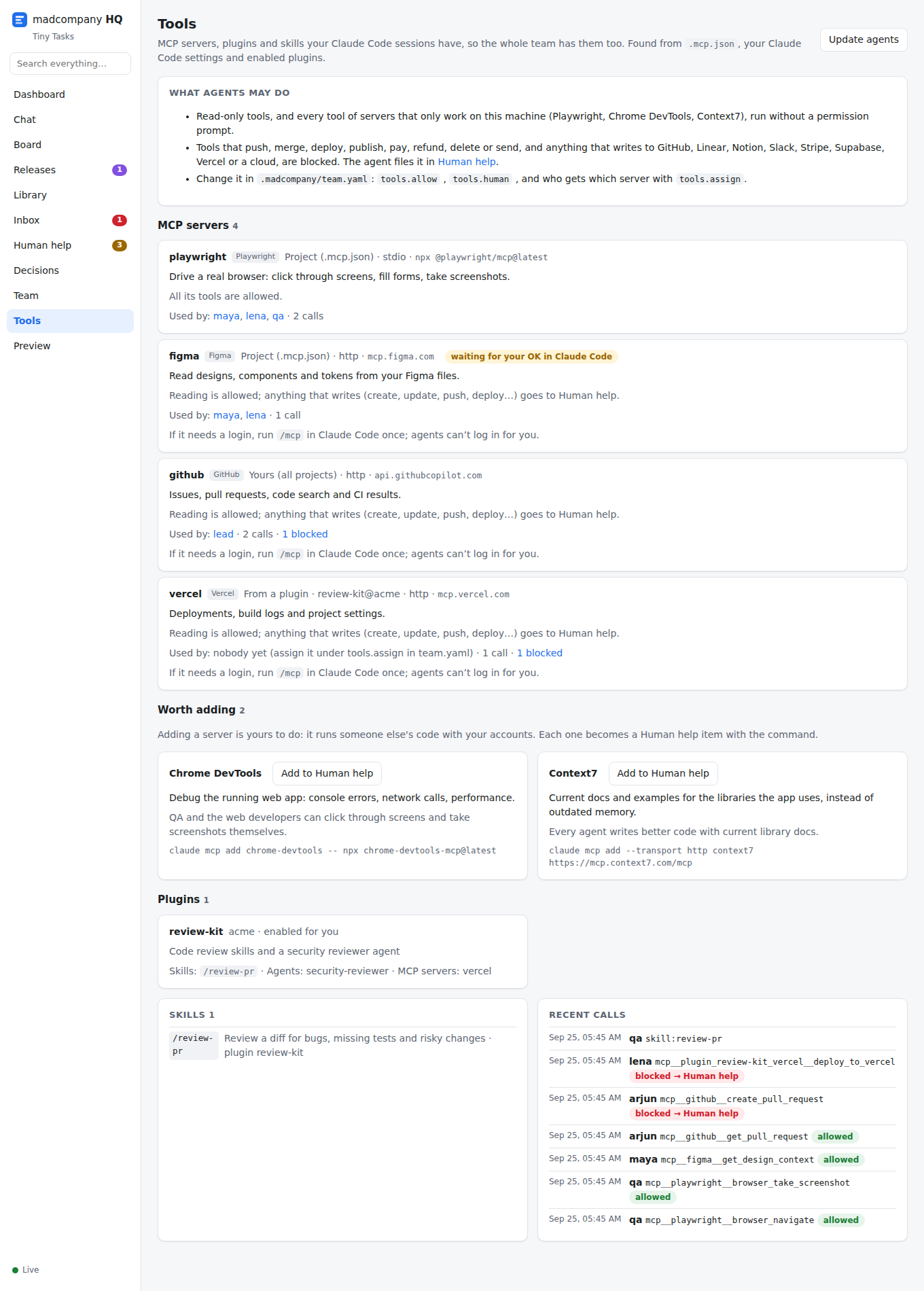
HQ → Tools reads the same files Claude Code does. It shows names, types and hosts only: never env values, headers, command arguments or URL query strings, which is where MCP configs keep their secrets.
Each role gets its own
Every agent's file has a Your tools section: the servers that fit its role, what each is for, and what it may do with them. The lead's morning briefing lists all servers, who uses them, and the plugin skills and agents it can use. Agents call mc_tools for the full picture.
| Server | Used by |
|---|---|
| Playwright, Chrome DevTools | QA, web developers, designers |
| Figma | UX and UI designers, web and mobile developers |
| Supabase, databases | Backend developers, database engineers |
| Sentry | Backend, DevOps, QA |
| Vercel, clouds | DevOps |
| GitHub, Linear, Jira | The lead, product manager |
| Context7 | Everyone |
Anything else: assign it in team.yaml, for example tools: { assign: { qa: [my-server] } }, then Update agents in HQ → Tools.
What runs without you
Background agents can't answer permission prompts, so without help they can't use MCP tools at all. The safety hook answers for them:
- Allowed: read-only tools (
get_…,list_…,search_…,read_…) and every tool of servers that only work on your machine or read public docs (Playwright, Chrome DevTools, Context7). - Yours, in Human help: tools that push, merge, deploy, publish, pay, refund, delete or send, and anything else that writes to systems other people see: GitHub, GitLab, Linear, Jira, Notion, Slack, Stripe, Supabase, Vercel, databases, clouds. The agent keeps going on a mock and files what it needed.
- Everything else follows your Claude Code permissions as usual.
Change it in .madcompany/team.yaml:
tools:
  auto_allow: true                              # false: no automatic allows at all
  allow: [mcp__github__create_pull_request]     # or a whole server: [mcp__linear]
  human: [mcp__supabase__execute_sql]           # always yours
Your own permissions.deny rules in Claude Code always win.
This was checked with a real headless Claude Code run: a read-only tool ran, a delete tool was blocked with the Human help message, and without madcompany's hook the read-only tool was denied.
Connecting a server is yours
Adding a server runs someone else's code with your accounts, and servers that need a login can only be connected by you (/mcp in Claude Code). HQ → Tools suggests servers for your project (Context7 for any project, Playwright for web apps, Sentry or Stripe if the code uses them, Figma if your Library has Figma links). Add to Human help turns one into an item with the exact claude mcp add command.
Every call is logged
Each MCP and skill call is recorded with its time, the agent and what the policy decided (never its inputs), so HQ → Tools shows which servers get used, by whom, and what was blocked.
Limits
- Claude Code can't limit plugin skills per agent, so every agent sees all of them; madcompany points each role at the relevant ones instead.
- Plugins are Claude Code's; a Codex host will get the MCP servers but not the plugins.